Sjur Usken

Views on new technologies and business opportunities from Sjur Usken

Tag Archives: VoIP

Are your provider ready for VoIP?


Companies are jumping on the VoIP wagon, but need to do their homework before implementing it locally and choosing a provider!

Tyler Merritt has written a nice article about it, I borrowed the bullet points:

Ask the provider detailed questions about their backbone.
Do they host their servers in a reputable data center? Do they get their bandwidth from a well-known provider like Level 3? A friend of mine thought it would be neat to start a VoIP company and began offering services through machines hosted in his garage. He did some good business for awhile, but his company didn’t last long.

Make sure your VoIP service requires authentication.
This point may seem like a no-brainer, but many VoIP providers do not require registration from the customer, making toll fraud incredibly easy for even amateur hackers. Authentication strings that use a hash in place of a clear-text password provide required security.

Find out what kind of VoIP architecture the provider uses.
Is their network built on a proprietary solution like Broadsoft or do they make use of Open Source VoIP solutions like Asterisk? Proprietary may turn out products with fewer initial bugs and open lines of communications to the developer via a support team, but Open Source means a much larger community of devoted followers hammering away at the application out of sheer pride and commitment to excellence. Asterisk is the most widely deployed Open Source telephony platform in the world precisely because so many people have contributed hours upon hours towards development and stability.

Figure out the DTMF type up front!
With analog lines and PRIs, DTMF was never really a consideration. VoIP companies have choices like rfc2833, inband, and info – and some companies use a different DTMF setting for inbound calls and outbound calls! If customers can reach your Auto Attendant but can’t dial an extension because key presses aren’t recognized, you might as well not have a phone system at all. This one is the Achilles Heel for almost every company I know.

Make sure your network supports QoS.
It cannot be stated enough that VoIP traffic on your network needs an all-access pass to the HOV lane. Because VoIP uses UDP instead of TCP, there are no second chances for these packets. They need to arrive in order, unchanged every time. If your network equipment does not support QoS, simple things like sending an email when someone is on the phone will have a noticeable effect to the conversation. Some customers may detect “clipping” or “clicking” on the line however briefly. A good QoS policy protecting VoIP easily soothes its greedy need for dedicated bandwidth. VoIP does not like to share.

[ad]

Presention VoIP attacks, tools and how to make a VoIP honeypot!


I’m soon off on a trip to Asia to do a presentation about VoIP security and how to make a VoIP honeypot!

The presentation does an introduction to VoIP protocols and how SIP works.
Then more details about the attacks seen the last 12 months.

Watch the whole presentation here. Comments are always appreciated!

[ad#std_banner]

[ad#250×250-hj%c3%b8rnegreier]

Probing with OPTIONS messages


I’m part of the Norwegian Chapter of the Honeynet Project. We have lots of honeypots with different services up and running. The most interesting for me is the VoIP honeypot. It captures all VoIP traffic and answers all incoming calls as a normal gateway or IP PBX (e.g. Asterisk) would do.

The latest traffic is again from the Piradius network.

The piradius network is now using “OPTIONS” to probe for existing IP PBX they can abuse for free calls.

Internet Protocol, Src: 124.217.230.65 (124.217.230.65), Dst: 195.159.X.X (195.159.X.X)
User Datagram Protocol, Src Port: rapido-ip (2457), Dst Port: sip (5060)
Session Initiation Protocol
Request-Line: OPTIONS sip:3392@195.159.X.X SIP/2.0
Message Header
Via: SIP/2.0/UDP 0.0.0.0:2457;branch=E7C34B92-11CE-87FE-DC76-8AA77F25C6B1;rport
Max-Forwards: 70
To:
From: ;tag=FB84E0A1-04AC-E4C2-D7E5-E49A34E3E90D
Call-ID: 185B191D-379F-888E-ABEB-E78C1B5DA498
CSeq: 1 OPTIONS
Contact:
Accept: application/sdp
Content-Length: 0

A new address
There is also a new IP address where the same attack is coming from. You can see it from the same structured OPTIONS message.

Internet Protocol, Src: 67.215.13.194 (67.215.13.194), Dst: 195.159.X.X (195.159.X.X)
User Datagram Protocol, Src Port: sybase-sqlany (1498), Dst Port: sip (5060)
Session Initiation Protocol
Request-Line: OPTIONS sip:2658@195.159.X.X SIP/2.0
Message Header
Via: SIP/2.0/UDP 0.0.0.0:1498;branch=BCEA2F83-1CEF-FC6A-2989-54C18CE6425E;rport
Max-Forwards: 70
To: <sip:2658@195.159.X.X>
From: <sip:8571@195.159.X.X>;tag=723535DC-E71F-E3D4-D572-2B41E58782E8
Call-ID: 4203F1B5-3E1F-E6D6-32FF-B8C2DFAA190F
CSeq: 1 OPTIONS
Contact: <sip:@0.0.0.0:1498;transport=udp>
Accept: application/sdp
Content-Length: 0

The packet would have been stopped in a firewall understanding SIP. The “VIA” and “Contact” field can not have a 0.0.0.0 IP address.

The OPTIONS command

From voip-info.org web page:
The SIP method OPTIONS allows a UA to query another UA or a proxy server as to its capabilities. This allows a client to discover information about the supported methods, content types, extensions, codecs, etc. without “ringing” the other party.

For example, before a client inserts a Require header field into an INVITE listing an option that it is not certain the destination UAS supports, the client can query the destination UAS with an OPTIONS to see if this option is returned in a Supported header field.

All UAs MUST support the OPTIONS method.

There has been less security concern about the OPTIONS implementations, since it is the INVITE that generates the call. But the OPTIONS can reveal a lot about what User-Agent/Server it is and version. Then it is just a quick search to find a bug or backdoor on this…..
[ad]

VoIP attacks are here again!


Have you seen the movie “The Lawnmower Man“? When, in the end, all phones in the whole world is ringing? This was the scenario for several firms in Norway this week. The phones rang every 20 minutes!

Whose fault is it?

And the guilty one? Several are to blame.

First; the Piradius (again…) network doing SIP and H.323 scans on open phones and gateways.
Second; the phone producer not making a secure enough phone.
Third; the people putting such a solution onto the Internet with no security.

What the attacker did

The Piradius network was scanning the network sequential and sending H.323 Call Connect to each IP address. The phones were open to invites from any IP address. The phones then rang, and when answered by some people there were nobody in the other end.

Information about the packet

In the h.323 packet the claim to use Cisco equipment, but I’ve never heard about a “balhophone”. If you do know, please comment! The version does sound too suspicious (1.666666). I’m guessing on an Asterisk….

vendor
           t35CountryCode: United States (181)
            t35Extension: 0
           manufacturerCode: 18
                             H.221 Manufacturer: Cisco (0xb5000012)
                            productId: balhophone
                            versionId: v 1.666666

The contact information within the H.323 packet for audio so totally different from where the TCP traffic is originated from. It is an unallocated space.

AS  | IP             | BGP Prefix   | CC | Registry | Allocated  | AS Name
NA | 36.27.177.136   | NA           |    |          |            | NA

The attacker has just used this IP address as a /dev/null for the audio of those that actually answered the phone. This RTP traffic back from mass calling can be a DoS attack in itself. If every packet you send on 1500 bytes generates a continues stream of 0,1Mbit (G711), it could take down the attacker itself….

The called number

Called party number: ’40#5926693444′

I’ve seen that they do include the # in several attacks previously, but this is not used in any part of Scandinavia to make an outbound call. If you know why an attacker is using the #, please let me know.
[ad]

The new Fritz!box 7270


I was lucky and getting my hands on the newest router from AVM, the Fritz!Box Fon WLAN 7270 (puuuhh, easy name).

When I first heard about the Fritz!Box, the exceptional thing was the ISDN interface. I’m living in Norway, and ISDN has been a great success here since the incumbent waited with DSL investments until most of us had gotten ISDN to dial-up the Internet.

The Fritz!Box has added up on it’s cool features, mentioning, ISDN (capable of either TE or NT mode), 2 analog ports, one analog port to connect to a phone line, DECT, USB 2.0 and WLAN (802.11 a/b/g/n (!!!)) running on its respective 2,4 and 5Ghz. No wonder AVM is starting to call it a “home server”!

I’m starting with the most important, VoIP. It is capable of three concurrent calls either direction and with several technologies. You can connect up to 8 ISDN phones in the ISDN port, several phones in both the analogue ports, and associate up to 6 DECT phones to the internal DECT base statin. But remember, only three calls at the same time, whatever technology used.

The Fritz!Box has built-in answering machine, built-in soft fax which sends the fax as a PDF in your e-mail. It lets you get rid of that fax machine and paper, thank you!

On the IP interfaces, It has ADSL2+, four (4) 10/100Mbit ports (why not 1000Mbit???). If you have cable modem or fiber connection, you can use the LAN1 port for Internet access instead of the built-in ADSL2+ port. It supports all protocols (like PPPoE, PPPoA, RFC1483 and more) needed for connecting up to an ISP.

What I really fancy, is the daily reports telling me how good my calls has been.

Internet Telephony Voice Transmission
This table shows detailed information about voice transmission during Internet telephony.
Duration (*) Remote Site Coding Packets (**) Lost Delay Jitter Burst Other
0:19 (300 ms) >| G.711 54921 (-) 0.0 % 14 ms 0 ms (0 %)

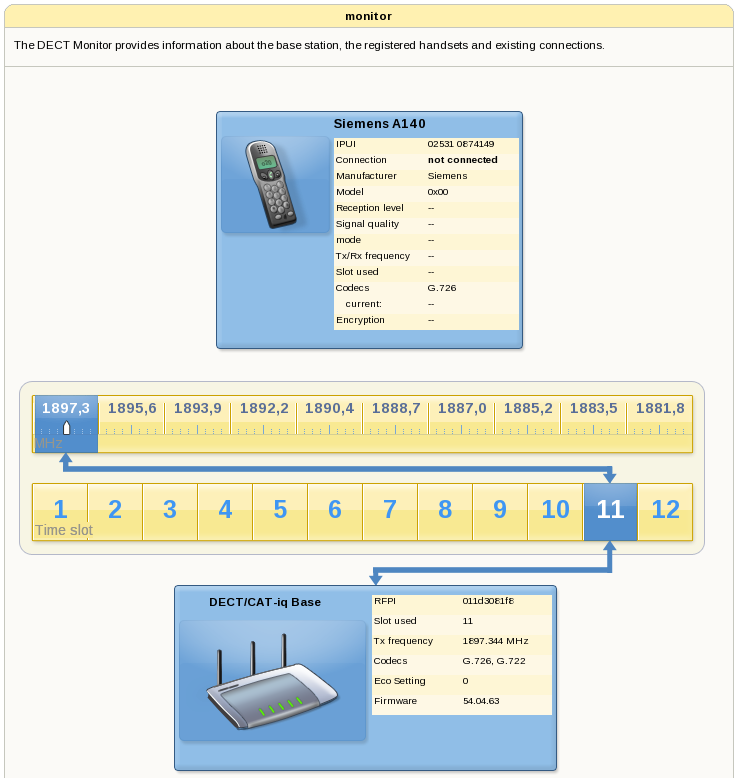
The web interface is even better. It has some really good and informative overviews of the different technologies. Here is the DECT overview:
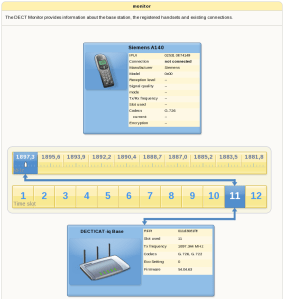
Monitor the DECT system in the Fritz unit

Monitor the DECT system in the Fritz unit

The Fritz!box has a USB 2.0 USB host port. Just plug a USB harddrive into it, and you are ready. Set a (good!) password on the share and you can access it as an FTP server from all over the Internet. AVM had also added a new Samba Server feature, [delete – with a small program installed,] so you have direct access to the USB port as a network share from all of your PCs. This is excellent for a small firm that needs to share a scanner or printer.

All in all, the Fritz!box is full of technologies, enabling it to fit most of an advance home or a small firm!
I love it!
[ad]
Asterisk vulnerabilites can be abused


I remember in the old times when Cisco was running the Call Manager on a Windows 2000 system. The Call Manager servers were always six months behind with patches and updates, and had to be protected at all costs. Caution has to be taken as always when enabling new services, and especially when it can hurt financially. PC World reports that “yes, you can abuse Asterisk with a bug for a time ago” in this article. They sited the IC3s article about VoIP fraud.

Do we need another firewall for all new services? There are several Media specialized firewalls, often called Session Border Controller that does this, but is this the way to do it? Probably not. IMHO it is to have a good security audit and overview of your own infrastructure, take control! Don’t buy yourself out of the current biggest threats, there will be new! Take control with IDS and even IPS, and have backup plans in case serious bugs and flaws makes your services vulnerable!

And good there is several other people talking about security, like Mark Collier and the folks behind the bluebox security podcast! Good job!

[ad]

VoIP system abused in an English bank service company…


I’ve had several responses to my previous article about VoIP attacks, and people are approaching the Honeynet organisation for help to figure out what they to do after being abused. This is both good and bad. Good that they seek help, bad that they do not have a IT security plan.

IT hacking costs money, and when implementing mis configured VoIP it shows up on the telephony bill as well. Previously it was costs that were not that obvious, down-time for the firm, stolen documents used against them in business competitions or just abuse of their Internet bandwidth to hurt others. How would the world been if all the security faults a firm had would show up on their monthly Internet bill? “Your computers have been participating in a DDoS attacking costing a firm 5 million, this is your cost”

The companies need to take security more serious. It is a war going on on the Internet where the strongest one will survive. And the war has begun for a long time ago…
[ad]

VoIP attacks are escalating


There has been numerous VoIP attacks from very different sources the latest months. In this article we will go through attacks towards two different companies in Norway. I will explain how they did it and how you can protect yourself against it.

Who was the attackers?

The attackers IP adresses:

  • 124.217.230.238
  • 124.217.230.225
  • 213.130.74.70
  • 213.130.74.72

The first two IP adresses belongs to “Piradius” network in Malaysia.

The second two IP addresses belongs to a VoIP company in Bulgaria, www.iconnectbg.net. These people has not been successful with their actions, but they had about 1000 SIP INVITES while trying to get through.

There was also some port scannings on port 5060 from an American IP, so we contacted the firm and it was most likely a break-in on the local servers.

The attackers business models

There seems to have been to way to make money. One way was to directly use it as an outbound gateway. This is quite risky since you have an existing business to protect.

The other way was to sell these minutes to another provider. One company specializing in discovering and making the gateway ready, then selling this access to prepaid phone card providers.

There are several others, like calling expensive numbers in other countries and then charging the terminating fees.

How did they find the VoIP gateways

The Piradius network (or the people hiring place in this network) did their port scanning from 124.217.252.238. First they search just for open ports, port 5060 (UDP and TCP!) and 1720 (h323). If you have a Cisco PSTN gateway, remember that the Cisco gateways can do both SIP UDP/TCP and H323. The first machine tried all different numbers similar to this.525551690000.

Example:

  • 00525551690000
  • 000=23525551690000
  • 00100525551690000

They tried a lot of different variations of this, and after a while they went over to a brute force way, just counting their way upwards

  • 26100525551690000
  • 26200525551690000
  • 26300525551690000
  • 26400525551690000

The always used caller ID 5199362832664 on all calls. They probably had an Asterisk on the other phone number, noticing when it rang and which gateway that then had been used.

What was configured wrong?

One of the customers with an Asterisk had included the “outbound” context to the SIP provider within the reach for the inbound context. Calls coming in and there were no matching numbers internally was routed out to the SIP provider. This is such a bad idea…

Another customer had a Cisco gateway. Cisco gateways just routes VoIP traffic the same as IP based on the dial-peers. It was configured properly with dial-peers but not with the correct access lists. The Cisco just needs 1 dial-peer configured to bounce traffic like this.

The motives

These two attacks were directed to get free calling. The calls were going to expensive countries like Cuba and Jamaica. There has been no directly breach on the system with username/passwords to gain access and get information. The objectives were to send free telephony traffic through the unsecured PBXs.

How to protect your VoIP equipment

  • Always have a firewall or session border controller (SBC is just a specialized VoIP firewall) between you and the Internet.
  • Limit your access to your VoIP servers from the rest of the world
  • Do not let inbound contexts in Asterisk have access to outbound.
  • Be careful with dial-in features and get a new dial-tone based on a password.
  • Update the software regularly.
  • Use VPN tunnels to protect the VoIP traffic going over the Internet
  • Use SIP TLS and SRTP if possible (we are waiting on hardware manufacturers here as well)
  • Shutdown all services on equipment that is not in use. Example H323 on a Cisco gateway used only for SIP

[ad]

VoIP News


[ad]

The quarterly VoIP vulnerability list


The VoIPSA blog released a quarterly overview of VoIP vulnerabilites for Q1 2008. Yes, it is a little old at the moment, but still interesting. The Cisco phones are on top when it comes to number of vulnerabilities. It is slightly more scary that a VoIP expert, InGate, also has errors on their equipment. It was an easy to exploit Denial-of-Service(DoS) bug, critical for those relying on InGate to protect them from DoS attacks.
[ad]

Design a site like this with WordPress.com
Get started