Sjur Usken

Views on new technologies and business opportunities from Sjur Usken

VoIP attacks are here again!


Have you seen the movie “The Lawnmower Man“? When, in the end, all phones in the whole world is ringing? This was the scenario for several firms in Norway this week. The phones rang every 20 minutes!

Whose fault is it?

And the guilty one? Several are to blame.

First; the Piradius (again…) network doing SIP and H.323 scans on open phones and gateways.
Second; the phone producer not making a secure enough phone.
Third; the people putting such a solution onto the Internet with no security.

What the attacker did

The Piradius network was scanning the network sequential and sending H.323 Call Connect to each IP address. The phones were open to invites from any IP address. The phones then rang, and when answered by some people there were nobody in the other end.

Information about the packet

In the h.323 packet the claim to use Cisco equipment, but I’ve never heard about a “balhophone”. If you do know, please comment! The version does sound too suspicious (1.666666). I’m guessing on an Asterisk….

vendor
           t35CountryCode: United States (181)
            t35Extension: 0
           manufacturerCode: 18
                             H.221 Manufacturer: Cisco (0xb5000012)
                            productId: balhophone
                            versionId: v 1.666666

The contact information within the H.323 packet for audio so totally different from where the TCP traffic is originated from. It is an unallocated space.

AS  | IP             | BGP Prefix   | CC | Registry | Allocated  | AS Name
NA | 36.27.177.136   | NA           |    |          |            | NA

The attacker has just used this IP address as a /dev/null for the audio of those that actually answered the phone. This RTP traffic back from mass calling can be a DoS attack in itself. If every packet you send on 1500 bytes generates a continues stream of 0,1Mbit (G711), it could take down the attacker itself….

The called number

Called party number: ’40#5926693444′

I’ve seen that they do include the # in several attacks previously, but this is not used in any part of Scandinavia to make an outbound call. If you know why an attacker is using the #, please let me know.
[ad]

The perfect router – Routerboard with Mikrotik!


I’ve heard about the Mikrotik router long before I bought one, and even then it went almost a year before I started playing around with it. Now I’m totally in love, if that is possible! It can do everything!!! EVERYTHING!!

The routerboards are small computers with several networking interfaces, Example the CPU is from 200MHz to 680Mhz and the network interfaces can be up to nine (9) LAN ports built-in and with several possibilities of expanding it further with WLAN on other models. The Mikrotik RouterOS is running on top of this and also works on standard x86 architecture, letting you use it on an existing server!

The routerboards with Mikrotik RouterOS is known for their extreme WLAN! This combination is used in several countries for connecting up rural areas. I’ve seen presentation where it connected two radios 97 kilometers apart on 2.4GHz! Mikrotik has their (proprietary) WLAN protocol with extended timers to allow for extreme ranges. The 802.11 standard would time-out long before the response from the other side.

On the wired side, the Mikrotik supports 10/100 Ethernet and one unit supports 10/100/1000Mbit. I bought a routerboard 450 with five (5) LAN interfaces and I thought that should be enough. Then I discovered all the possibilities with the Mikrotik OS….

They have a recent feature called Ethernet over IP. It sounds slightly stupid, since normally IP is running over Ethernet, not vica versa. But this great feature let’s you bridges two networks (on Layer2) over any IP connection! It allows me to dedicate a port on my local router which logically is on my brothers network 500km away, allowing us to play Xbox directly as we were in the same room and LAN! Perfect! (he has a fiber 10/10Mbit connection, so it is limited to this speed)

rb450 routerboard

The RB450 routerboard

The fifth port is used for sniffing on the interfaces I want to, the fourth is my brothers network (with EoIP), the third is the local LAN, the second is my public network and the first is the WAN interface.. puuhh.. Now I need to order an extra switch so I can trunk several interfaces onto a new switch… (yes, of course the routerboard supports VLAN!)

Besides the EoIP, Mikrotik does PPP, L2TP, PPTP, IPSec and does support a large number of routing protcols (RIP, OSPF, BGP)
[ad]

The new Fritz!box 7270


I was lucky and getting my hands on the newest router from AVM, the Fritz!Box Fon WLAN 7270 (puuuhh, easy name).

When I first heard about the Fritz!Box, the exceptional thing was the ISDN interface. I’m living in Norway, and ISDN has been a great success here since the incumbent waited with DSL investments until most of us had gotten ISDN to dial-up the Internet.

The Fritz!Box has added up on it’s cool features, mentioning, ISDN (capable of either TE or NT mode), 2 analog ports, one analog port to connect to a phone line, DECT, USB 2.0 and WLAN (802.11 a/b/g/n (!!!)) running on its respective 2,4 and 5Ghz. No wonder AVM is starting to call it a “home server”!

I’m starting with the most important, VoIP. It is capable of three concurrent calls either direction and with several technologies. You can connect up to 8 ISDN phones in the ISDN port, several phones in both the analogue ports, and associate up to 6 DECT phones to the internal DECT base statin. But remember, only three calls at the same time, whatever technology used.

The Fritz!Box has built-in answering machine, built-in soft fax which sends the fax as a PDF in your e-mail. It lets you get rid of that fax machine and paper, thank you!

On the IP interfaces, It has ADSL2+, four (4) 10/100Mbit ports (why not 1000Mbit???). If you have cable modem or fiber connection, you can use the LAN1 port for Internet access instead of the built-in ADSL2+ port. It supports all protocols (like PPPoE, PPPoA, RFC1483 and more) needed for connecting up to an ISP.

What I really fancy, is the daily reports telling me how good my calls has been.

Internet Telephony Voice Transmission
This table shows detailed information about voice transmission during Internet telephony.
Duration (*) Remote Site Coding Packets (**) Lost Delay Jitter Burst Other
0:19 (300 ms) >| G.711 54921 (-) 0.0 % 14 ms 0 ms (0 %)

The web interface is even better. It has some really good and informative overviews of the different technologies. Here is the DECT overview:
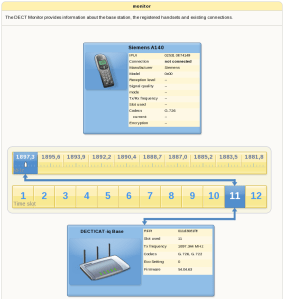
Monitor the DECT system in the Fritz unit

Monitor the DECT system in the Fritz unit

The Fritz!box has a USB 2.0 USB host port. Just plug a USB harddrive into it, and you are ready. Set a (good!) password on the share and you can access it as an FTP server from all over the Internet. AVM had also added a new Samba Server feature, [delete – with a small program installed,] so you have direct access to the USB port as a network share from all of your PCs. This is excellent for a small firm that needs to share a scanner or printer.

All in all, the Fritz!box is full of technologies, enabling it to fit most of an advance home or a small firm!
I love it!
[ad]

Asterisk vulnerabilites can be abused


I remember in the old times when Cisco was running the Call Manager on a Windows 2000 system. The Call Manager servers were always six months behind with patches and updates, and had to be protected at all costs. Caution has to be taken as always when enabling new services, and especially when it can hurt financially. PC World reports that “yes, you can abuse Asterisk with a bug for a time ago” in this article. They sited the IC3s article about VoIP fraud.

Do we need another firewall for all new services? There are several Media specialized firewalls, often called Session Border Controller that does this, but is this the way to do it? Probably not. IMHO it is to have a good security audit and overview of your own infrastructure, take control! Don’t buy yourself out of the current biggest threats, there will be new! Take control with IDS and even IPS, and have backup plans in case serious bugs and flaws makes your services vulnerable!

And good there is several other people talking about security, like Mark Collier and the folks behind the bluebox security podcast! Good job!

[ad]

So cute, but full p2p wlan routers! Incredible!


On the village-telco mailinglist there were a lead about these Accton wlan mesh routers. The routers are not new, FON uses them extensively, but I decided to try them out. I ordered three of them from the open-mesh website and got them a week later. My first impression was: “Damn, so small!!”.

They came in a brown box each, no manual, just a power supply and a strange flat Ethernet cable. It was really just to plug them into an Internet connection and do all of the configuration on www.open-mesh.com‘s Dashboard. Here you can edit the two SSIDs, one open and one private. On the open SSID you can configure a splash (welcome) page and if you want to use user authentication. You can choose from four commercial or if you have your own RADIUS server. I would believe FON would be one of these, but was not there. Probably you gotta flash the router with FON software, but that is probably a one-way road since FON has closed the SSH access.

The units were up and running from the box, I only had to type in the 5.x.x.x IP or MAC address to add the nodes to my network. I thought of what would happen with these unit if Open-Mesh put down their business, but was really relaxed reading their roadmap: Open Source management. Open-Mesh.com is supporting open-source mesh management solutions. We are contributing to a project being done at UNC Chapel Hill (http://orangemesh.sourceforge.net) to create a truly open-source management server for RO.B.IN mesh networks. It will automatically migrate your open-mesh networks to your own server without needing to re-enter data. We will re-integrate with that solution when it is complete and release our server as open-source as well (as one combined project). So stay tuned, these projects are both expanding and merging and will be completely open source.

Performance

I plugged a pc into the LAN port on one of the units directly linked to the one with Internet access. First I just managed to get 390/90 Kbit throughput, but realizing it was set a bandwidth limitations on it through the Dashboard. I set this to “0”, disablign it, and I was able to make up to 4Mbit throughput either ways. I found this very little to be a 802.11g WLAN. I will do further studies of what limits this traffic.

Security

There is no encryption as far as I know on the mesh connections. These are open-air traffic easy to sniff. There is a strong advice also to change the default root password on SSH through the Dashboard. If you put one of the routers on a public IP, anyone can SSH into it with the default password. They will then get a shell like this:

BusyBox v1.4.2 (2007-11-02 12:20:05 PDT) Built-in shell (ash)
Enter 'help' for a list of built-in commands.

_______                          ________             __
|       |.-----.-----.-----.  _  |        |.-----.----|  |__
|   -   ||  _  |  -__|     | |_| |  |  |  ||  -__|__--|     |
|_______||   __|_____|__|__|     |__|__|__||_____|____|__|__|
|__|  http://www.open-mesh.com ---------------------

Powered by these open source projects:

http://www.blogin.it       http://kokoro.ucsd.edu/nodogsplash
http://www.openwrt.org     http://www.open-mesh.org
http://www.olsr.org        http://coova.org/
Version: r1421 2.6.21.5
-------------------------------------------------------------

[ad]

VoIP system abused in an English bank service company…


I’ve had several responses to my previous article about VoIP attacks, and people are approaching the Honeynet organisation for help to figure out what they to do after being abused. This is both good and bad. Good that they seek help, bad that they do not have a IT security plan.

IT hacking costs money, and when implementing mis configured VoIP it shows up on the telephony bill as well. Previously it was costs that were not that obvious, down-time for the firm, stolen documents used against them in business competitions or just abuse of their Internet bandwidth to hurt others. How would the world been if all the security faults a firm had would show up on their monthly Internet bill? “Your computers have been participating in a DDoS attacking costing a firm 5 million, this is your cost”

The companies need to take security more serious. It is a war going on on the Internet where the strongest one will survive. And the war has begun for a long time ago…
[ad]

Are there any Asterisk and SRTP implentations at all?


I started digging into SRTP and Asterisk sphere. There does not seems to be any functional deployments. I’ve just found old stuff from 2006 where it was supposed to work, but I’ve not been able to re-do it. I thought it would be standard in Trixbox or other Asterisk distributions by this time!

Quote from voip-info.org “As of now (Jul 2008) Asterisk does not come with released support for voice encryption!”

The links I’ve found:

There is a stand-alone VoIP software named Zfone you can use for encrypting your RTP stream, made by Phil Zimmermann (also created PGP).It is a plug-in to tunnel your existing RTP stream through its encrypted ZRTP protocol. To use ZRTP with Asterisk you need to get a special patch, for this you need to e-mail the Zfone Project for a copy…. here is a short study of Zfone by Samuel Sotillo.

So were does it leave us? Skype has 256bit AES encoding, good for the most of us. Link it up with a Skype channel for Asterisk and you can at least access Asterisk encrypted, but not from a SIP phone.

Do you have any working installations you would like to share? Please e-mail me!
[ad]

VoIP for the 3rd world!


I have been following with great excitement the projects to provide phone and Internet communication to the 3rd world! They are called Village Telcos. There is great work been done by local people bringing communication to those who normally can not afford it. I believe information is the solution for a better world! Knowledge is power! Here is some good projects and organisations:

Dabba is a telecom and Internet provider in Orange County in South Africa. Dabba telecom is a company that is providing voice and data services to under-serviced areas. dabba has built a distributed community based ownership model.They have been helped by the Shuttleworth Foundation to create a usable wireless and telephony device. It is a combination of WLAN mesh networks and VoIP to deliver their services.

Inveneo is an organization helping projects in the 3rd world. “Inveneo is a non-profit social enterprise whose mission is to get the tools of ICT into the hands of organizations and people who need them most: those in remote and rural communities in the developing world.” They help other organisations to help Africa.

Inveneo are experts in:

  • Ultra low-power computers and servers
  • Long-distance wireless (WiFi) Local-Area Networking (LAN) gear
  • VoIP telephony software and integrated hardware
  • Free and Open source operating systems for servers and desktops

I love the idea to combine open source, wlan mesh (wireless p2p networking) and VoIP to bring information to the ones needing it the most! I’m trying to help as best as I can on these projects, but its not that easy as a by-stander. There are good discussions on the mailing lists and they all get proper responses. I’ve ordered several of the WLAN units to set up a neigbourhood mesh network to learn more.

I’ve talked with one that was in Uganda, and the advise from him was to go down yourself and see how you can help. It’s hard trying to help when you don’t even know what is happening locally. I’ve checked up on plane tickes, expensive…, but also gotta get some local contacts before travelling down there. If you know any, please let me know!

Next steps: Build the WLAN mesh network, set up the VoIP billing server, share the knowledge!
[ad]

Make Norway a developing country!


Just got a tip from my friends to watch Fredrik Härén presentation on the “Day of Knowledge” in Sweden. It is on youtube free to watch for anyone understanding Swedish. It is totally about 47 minutes in five parts. (Part 1, Part 2, Part 3, Part 4, Part 5)

httpv://www.youtube.com/watch?v=yH6-ihF2E48

He has a formula for ideas which goes like this: idea(s) = People ( Knowledge + Information )

Get knowledge, get information about the situation and then come togheter for the great ideas! Fantastic!

He also mentioning the divide about developing and developed countries. When developing countries are more technology advanced than the developed world, why use these terms? It is just stupid. He argues that the developed countries must stop sitting on their “high chairs” and get down to business. The developed world has been lazy the last decades and is falling behind on creating the future! I only wish the Norwegian politicians could see and understand this….
[ad]

Fredrik is also in charge of Convenient Info which is a company to create information from all the data available on the Internet.

VoIP attacks are escalating


There has been numerous VoIP attacks from very different sources the latest months. In this article we will go through attacks towards two different companies in Norway. I will explain how they did it and how you can protect yourself against it.

Who was the attackers?

The attackers IP adresses:

  • 124.217.230.238
  • 124.217.230.225
  • 213.130.74.70
  • 213.130.74.72

The first two IP adresses belongs to “Piradius” network in Malaysia.

The second two IP addresses belongs to a VoIP company in Bulgaria, www.iconnectbg.net. These people has not been successful with their actions, but they had about 1000 SIP INVITES while trying to get through.

There was also some port scannings on port 5060 from an American IP, so we contacted the firm and it was most likely a break-in on the local servers.

The attackers business models

There seems to have been to way to make money. One way was to directly use it as an outbound gateway. This is quite risky since you have an existing business to protect.

The other way was to sell these minutes to another provider. One company specializing in discovering and making the gateway ready, then selling this access to prepaid phone card providers.

There are several others, like calling expensive numbers in other countries and then charging the terminating fees.

How did they find the VoIP gateways

The Piradius network (or the people hiring place in this network) did their port scanning from 124.217.252.238. First they search just for open ports, port 5060 (UDP and TCP!) and 1720 (h323). If you have a Cisco PSTN gateway, remember that the Cisco gateways can do both SIP UDP/TCP and H323. The first machine tried all different numbers similar to this.525551690000.

Example:

  • 00525551690000
  • 000=23525551690000
  • 00100525551690000

They tried a lot of different variations of this, and after a while they went over to a brute force way, just counting their way upwards

  • 26100525551690000
  • 26200525551690000
  • 26300525551690000
  • 26400525551690000

The always used caller ID 5199362832664 on all calls. They probably had an Asterisk on the other phone number, noticing when it rang and which gateway that then had been used.

What was configured wrong?

One of the customers with an Asterisk had included the “outbound” context to the SIP provider within the reach for the inbound context. Calls coming in and there were no matching numbers internally was routed out to the SIP provider. This is such a bad idea…

Another customer had a Cisco gateway. Cisco gateways just routes VoIP traffic the same as IP based on the dial-peers. It was configured properly with dial-peers but not with the correct access lists. The Cisco just needs 1 dial-peer configured to bounce traffic like this.

The motives

These two attacks were directed to get free calling. The calls were going to expensive countries like Cuba and Jamaica. There has been no directly breach on the system with username/passwords to gain access and get information. The objectives were to send free telephony traffic through the unsecured PBXs.

How to protect your VoIP equipment

  • Always have a firewall or session border controller (SBC is just a specialized VoIP firewall) between you and the Internet.
  • Limit your access to your VoIP servers from the rest of the world
  • Do not let inbound contexts in Asterisk have access to outbound.
  • Be careful with dial-in features and get a new dial-tone based on a password.
  • Update the software regularly.
  • Use VPN tunnels to protect the VoIP traffic going over the Internet
  • Use SIP TLS and SRTP if possible (we are waiting on hardware manufacturers here as well)
  • Shutdown all services on equipment that is not in use. Example H323 on a Cisco gateway used only for SIP

[ad]

Design a site like this with WordPress.com
Get started